Monday, October 23, 2017

KRACK Vulnerability: What You Need To Know

This week security researchers announced a newly discovered vulnerability dubbed KRACK, which affects several common security protocols for Wi-Fi, including WPA (Wireless Protected Access) and WPA2. This is a bad vulnerability in that it likely affects billions of devices, many of which are hard to patch and will remain vulnerable for a long time. Yet in light of the sometimes overblown media coverage, it’s important to keep the impact of KRACK in perspective: KRACK does not affect HTTPS traffic, and KRACK’s discovery does notmean all Wi-Fi networks are under attack. For most people, the sanest thing to do is simply continue using wireless Internet access.

The limited privacy goals of WPA

It’s worth taking a step back and remembering why a cryptographic protocol like WPA was developed to begin with. Before the advent of Wi-Fi, computers typically connected to their local Internet access point (e.g. a modem) using a physical wire. Traditional protocols like Ethernet for carrying data on this wire (called the physical layer) were not encrypted, meaning an attacker could physically attach an eavesdropping device to the wire (or just another computer using the same wire) to intercept communications. Most people weren’t too worried about this problem; physically attaching a device is somewhat difficult, and important traffic should be encrypted anyways at a higher layer (most commonly a protocol like TLS at the transport layer). So Ethernet was unencrypted, and remains so today.
With wireless protocols it became much easier to eavesdrop on the physical layer. Instead of attaching a device to a specific wire, you just need an antenna somewhere within range. So while an unencrypted wireless network is theoretically no less secure than an unencrypted wired network, in practice it’s much easier to set up an eavesdropping device. For some it became a hobby to drive or bike around with an antenna looking for wireless networks to eavesdrop on (called wardriving). In response, the IEEE (a computer and electronics engineers’ professional organization) standardized an encryption protocol called WEP (Wired Equivalent Privacy). The name is telling here: the goal was just to get back to the relative privacy of a wired connection, by using encryption so that an eavesdropping device couldn’t read any of the traffic. WEP was badly broken cryptographically and has been supplanted by WPA and WPA2, but they have the same basic privacy goal.
Note that WPA’s privacy goals were always very limited. It was never intended to provide complete confidentiality of your data all the way to its final destination. Instead, protocols like TLS (and HTTPS) exist which protect your data end-to-end. In fact, WPA provides no protection against a number of adversaries:
  • At any point between the access point and the server you’re communicating with, an eavesdropper can read your data whether the first hop was WPA, Ethernet, anything else. This means your Internet provider or any Internet router on the network path between you and the destination server can intercept your traffic.
  • Your access point operator (e.g. the owner of your local coffee shop) can read your traffic.
  • Anybody who compromises your access point can read your traffic, and there is a long history of exploits against wireless routers.
  • Anybody who knows the access point’s password can perform a machine-in-the-middle attack and read your traffic. This includes anybody who cracks that password.

A secondary goal: access control

In addition to providing privacy against local eavesdroppers, WPA is commonly used to provide access control to the network by requiring the use of a “pre-shared key” to create sessions. This is the Wi-Fi access password or token which is familiar to most users when trying to connect to a new network. The goal here is simple: the owner of the wireless access point may want to prevent access by unauthorized devices, require new devices to jump through some hoops like watching an advertisement or agreeing to a terms of use agreement, or otherwise alter traffic for unauthorized guests. For years EFF has supported increased availability of open wireless access points, but certainly access point owners should have the ability to limit access if they want to.

How KRACK changes the picture

KRACK makes it possible for an adversary to completely undermine the privacy properties of WPA and WPA2 in many cases. The attack is somewhat complex in that it requires active broadcasting of packets and tricking a device into resetting its key, but it’s the kind of thing that will likely soon be automated in software. This means that, for now, data on many wireless access points may be vulnerable to interception or modification. Keep in mind two big caveats:
  • The attacker must be local and proactive. Carrying out this attack requires having an active antenna in range of the targeted wireless network and requires broadcasting many packets and intercepting or delaying others. This is all doable, but does not easily scale.
  • Important traffic should already be protected with HTTPS. As discussed above, there are already many potential attackers that WPA provides no security against. At worst, KRACK adds an additional one to the list, but with no more power than you ISP or any router on the Internet backbone already has (and those are much more scalable places to conduct surveillance or other mischief). We already have protocols to defend against these attackers, and thanks to the success of projects like EFF’s Encrypt The Web initiative more than half of all Internet traffic is already protected by HTTPS.
On the access control front, it’s unclear how much KRACK matters. It does not provide a new way to crack the pre-shared key or password of a wireless network. Some variants of KRACK enable recovering enough key material to hijack an existing connection and use it to gain unauthorized access, but this is probably not the easiest way to gain unauthorized access.

How did we get here?

Matt Green provides a great overview of the flawed process that led to KRACK being undiscovered for over a decade. The biggest single problem is that the protocol definitions were not easily available to security researchers, so none bothered to seriously look. This is another clear example of why important protocols like WPA and WPA2 should be open and free to the public: so that security researchers can investigate and catch these sorts of vulnerabilities early in the life of a protocol, before it’s embedded in billions of devices.

What you can do to protect your local network

Fortunately, while the KRACK vulnerability is baked into the WPA specification and deployed on billions of devices, it is relatively easy to patch in a backwards-compatible way. It requires patching both devices that connect to the Internet and access points. If you operate a wireless network, patching your router is a great step. Your Internet devices (your computer, phone or tablet) will also need to be patched. Many patches are already available and many devices will automatically be patched.
With that said, it’s a forgone conclusion that there will still be billions of unpatched devices for years (maybe even decades) to come. That’s because, as we’ve said before:
patching large, legacy systems is hard. For many kinds of systems, the existence of patches for a vulnerability is no guarantee that they will make their way to the affected devices in a timely manner. For example, many Internet of Things devices are unpatchable, a fact that was exploited by the Mirai Botnet. Additionally, the majority of Android devices are no longer supported by Google or the device manufacturers, leaving them open to exploitation by a "toxic hellstew" of known vulnerabilities.
So while we don’t think people should necessarily freak out about KRACK, it does demonstrate once again how important it is for industry to solve the patching problem.

BOUNDHOOK: EXCEPTION BASED, KERNEL-CONTROLLED USERMODE HOOKING


In this article, we’ll present a new hooking technique that we have found during our research work.
Hooking techniques give you control over the way an operating system or a piece of software behaves. Some of the software that utilizes hooks include: application security solutions, system utilities, tools for programming (e.g. interception, debugging, extending software, etc.), malicious software (e.g. rootkits) and many others.
Please note, this is neither an elevation nor an exploitation technique. This technique can be used in a post-exploitation scenario in which the attacker has control over the asset. Since malicious kernel code (rootkits) often seeks to establish persistence in unfriendly territory, stealth technology plays a fundamental role.
Technical Description
The idea behind this BoundHook technique is to cause an exception in a very specific location in a user-mode context and catch the exception to gain control over the thread execution.
To do this, we can use the BOUND instruction, which is part of Intel MPX (Memory Protection Extensions). This instruction is designed to (along with the compiler, runtime libraries and OS support) increase software security by checking pointer references whose normal compile-time intentions are maliciously exploited at runtime due to memory corruption vulnerabilities.
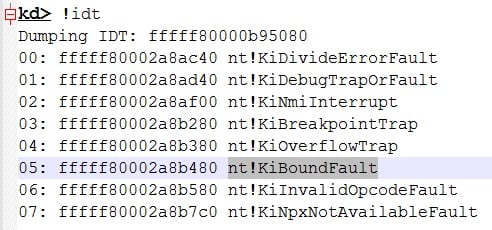
In a nutshell, the BOUND instruction checks an array index against bounds and raises software interrupt 5 if the test fails (32-bit: nt!KiTrap05, 64-bit: nt!KiBoundFault).
Why not just do a comparison, you ask? Because Intel designed this new instruction to generate a fault that will enable the OS to examine the bound check failure.
The instruction’s syntax is as follows –
BOUND r16, m16&16 – Checks if r16 (array index) is within bounds specified by m16&16
BOUND r32, m32&32 – Checks if r32 (array index) is within bounds specified by m32&32
When a bound fault occurs, the trap handler calls nt!KiHandleBound and then executes registered bounds-exception callback routines.
A kernel-mode driver or a shellcode payload running in kernel-mode can register a callback routine for bound faults using nt!KeRegisterBoundCallback. This function is not “exported” by the WDK headers, and a pointer to the function has to be obtained dynamically.
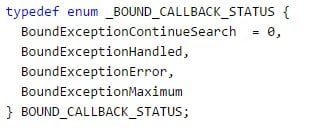
The callback routine has no parameters and should return a BOUND_CALLBACK_STATUS, which is basically:
After completion of the bound fault registration, the kernel-mode code should get a pointer to the user-mode DLL (or any other PE) base address and calculate the address of the function that it’s about to hook.
Obtaining a function address is a simple task and can be accomplished in various ways, for example by parsing the PE header. Please note, parsing an image that is loaded into a specific process should be done in the process’s context or using the appropriate APIs.
Once our code is done calculating the function address, it would be nice to simply start writing to that address. However, because this code resides in read/execute only memory, we are unable to do this.
Windows memory protection relies on the following factors:
  • The R/W flag in PDEs and PTEs (read only = 0, read/write = 1).
  • The U/S flag in PDEs and PTEs (supervisor mode = 0, user mode = 1).
  • The WP flag in the CR0 register (17th bit).
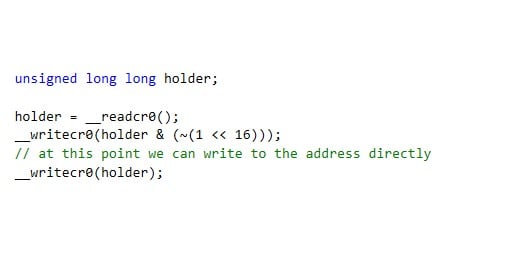
Now, we have a few options. We can either write to that address in a way that would trigger the COW (copy-on-write) protection or, to achieve maximum stealth, we can write directly to the function address in one of two ways. We can either manipulate the CR0 register using __readcr0() and __writecr0(), or we can allocate our own memory descriptor list (MDL) to describe the memory pages and adjust permissions on the MDL using a bitwise OR and the MDL_MAPPED_TO_SYSTEM_VA. The MDL approach will be much more “stealthy”, since it’s completely invisible by design to the current PatchGuard implementation.
First, here’s how we can use the CR0 approach. The CR0 register description, taken from the Intel 64 and IA-32 Architectures Software Developer’s Manual reads:
“WP Write Protect (bit 16 of CR0) — When set, inhibits supervisor-level procedures from writing into readonly pages; when clear, allows supervisor-level procedures to write into read-only pages (regardless of the U/S bit setting; see Section 4.1.3 and Section 4.6).”
Here is an example of cr0 register manipulation:
Writing directly to the DLL’s COW page will allow us to hook every process on the system that is using this DLL since it will affect the cow-origin page.
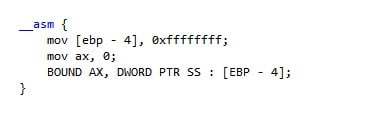
Triggering a bound fault is easy. For example, this code will trigger a fault:
Thus, our kernel-mode code that performs the hooking should write a similar assembly code to the place where it wants to get control over the execution of the thread.
For example, if we want to hook KERNELBASE!CreateFileW, we can inject these opcodes to the function’s prologue:
UCHAR opcodes[5]= {0x36, 0x66, 0x62, 0x0C, 0x24};
This is basically: BOUND CX, DWORD PTR SS : [ESP]. In this specific case, we assume that CX will be zero (when used in real code this should be tested for every function) and the top of stack will be greater than zero (as this is a proof of concept and not a released tool).
Now, after writing this to the KERNELBASE!CreateFileW  prologue, when a user-mode thread calls this function our kernel-mode callback function will take control of the thread.
Doing this, gives us a lot of advantages, for example –
  • The hooked page will still be COW, thus anti-malware solutions and researchers doing manual analysis won’t be able to notice that the page has been modified.
  • Most AVs are unaware of this method and probably aren’t addressing it (especially since the page is still COW).
  • A user-mode debugger will not be able to catch this hook. A regular inline hook method makes the hooked routine jump to another user-mode code, but BoundHook’s method traps the execution flow by the kernel bound faults handler.
  • This method is invisible to most PatchGuard (PG) protection mechanisms. The MDL approach to bypass the COW mechanism is not detectable by PG today by design. As for the CR0 modification approach, although the CR0 is protected by PG, since it is modified for a very short period of time, the chance of being caught by PG is minimal.
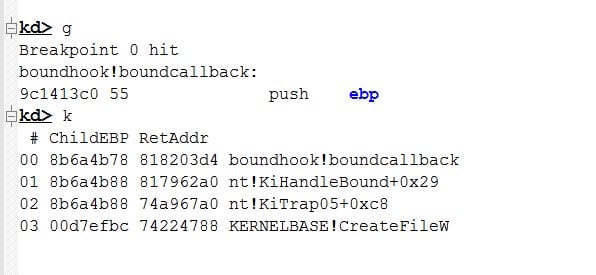
Proof-of-concept, a call stack of a hooked thread:
We know that BoundHook does not meet Microsoft’s bar to be considered a vulnerability, as machine administrator rights are already compromised. Microsoft’s response on receiving responsible notification of a similar issue from CyberArk (GhostHook) was as follows:
“We have completed our investigation of this issue and have found that it is not a vulnerability but a technique to avoid detection once the machine is already compromised. Because it’s a post-exploitation technique it doesn’t meet the bar for servicing in a security update but we will consider fixing it in a future version of Windows.”
In conclusion, this method will bring new capabilities to both software security vendors and malware writers.

Three Key Steps For Locking Down Critical Privilege Accounts.


Let’s cut to the chase: Most IT professionals understand cyber attacks will happen, and it’s simply a matter of when. Every major breach has a common denominator: compromised privileged accounts. They are an essential element of the attack lifecycle and must be secured.
I recently presented a webcast on three key steps organizations can take to protect their most critical privileged accounts. Here’s an overview of each of these steps:
Take Control: Locking Down Credentials and Endpoints
Locking down credentials and endpoints is a crucial first step in an environment that does not have privileged credential security in place. The hardest part is figuring out where to start. You’ll need to identify and prioritize which accounts present the greatest risk and therefore need to be locked down first.
  • Credential The first step is to figure out exactly where your account credentials actually “live” within your environment. Only then can you truly understand which ones need to be locked down immediately and which ones can be de-provisioned. For example, your organization may currently have 150 separate domain admin accounts that can feasibly be trimmed down to one or, at the minimum, just a handful.
  • Endpoints. They continue to be attractive entry points for attackers. Identifying users with local administrator rights and removing those rights is a critical first step to securing your organization’s endpoints. From there, you can create policies against those endpoints. For example, you can dictate which applications can run in administrative mode and which ones cannot. Least privilege and application control are best practices to follow and a strong defensive combo.
Often, the discovery process is easier said than done. The average organization has 3X to 4X more privileged accounts than employees. Tools such as CyberArk DNA can help streamline the arduous process of discovering privileged accounts—on-premises or in the cloud, assessing privileged account security risks to help you prioritize actions and identify accounts with local admin rights. Using such a tool, you can also pinpoint embedded and hard-coded credentials stored within applications and uncover which machines are vulnerable to credential theft attacks, such as harvesting, Pass-the-Hash, Overpass-the-Hash and Golden Ticket. Discovery tools are particularly helpful in cloud environments. For example, in AWS or Azure, organizations can quickly find and identify AWSIM rules, users, Access Keys and EC2 Key pairs.
Once you identify where these credentials are, you can take ownership and action by placing them in a secure space or vault.
Isolate and Control Sessions
Once all of these critical accounts are located within a vault, it’s time to turn your attention to usage control. In today’s collaborative environment, many people need access to privileged accounts—from third-party contractors to temporary employees and more. Solutions such as CyberArk Privileged  Session Manager can help manage and monitor privileged account sessions without impacting the end-user experience OR disrupting system administrators’ workflow. It allows users to connect to target systems within their environment via an agentless jump server. This isolates the user from the target systems’ passwords (ensuring credentials never reach endpoints) while enabling authorized access so s/he can perform necessary duties. Meanwhile, the secure vault keeps the passwords hidden and protected and rotates them (either each time they are used or on a set scheduled cycle). Monitoring and recording capabilities enable security teams to track user activity, pinpoint suspicious privileged sessions and immediately terminate them, as needed.
A key, added bonus is that organizations can continue to leverage native tools such as Putty, remote desktop connection manager, etc. CyberArk can configure these tools to be able to go through the CyberArk proxy channels to get to those target systems without introducing a lot of latency between the user and the job that they’re there to do.
Keep a Watchful Eye
The last step is keeping a watchful eye and making sure that you understand where anomalies are actually taking place in the day-to-day routine. For example, does John typically work from 8:00 to 5:00, but suddenly starts to check out passwords at 2:00 a.m.?  Was that really even John, or was it someone else?  Or, what if John normally checks out 10 to 15 passwords per day, then all of a sudden he starts checking significantly more?
But it’s not just user behavioral analytics—it’s also environmental. What happens if we can detect the very first time that someone is able to compromise the system by brute-forcing their way in as an administrator or another admin account?  Or creating a backdoor account and then logging into it at strange hours?
CyberArk Privileged  Treat Analytics  is a security intelligence system that allows organizations to detect, alert and respond to attacks targeting privileged accounts. It is designed to identify an attack in real-time and automatically respond to stop an attacker from moving laterally to advance the attack. Because in order to move laterally, the attacker needs to have the necessary credentials to escalate privileges. CyberArk individualizes every single password, and therefore, stops the lateral movement and shuts down the pathway. With CyberArk, organizations can set baselines and create thresholds for anomalies and get notifications immediately on true security events, which helps to lower the alert volume. Additionally, taking advantage of integrations—or tools that speak fluently with each other—helps to minimize alert fatigue.
For additional details on the attack lifecycle and how privileged accounts come into play, along with common hurdles to establishing the most effective protection, I invite you to view the on-demand presentation.

Thursday, October 12, 2017

How to prevent Cross-Site Scripting (XSS) ?

XSS vulnerabilities are common enough to have graced application as big and popular as Facebook,Google and Paypal, and XSS has been mainstay on the OWASP Top 10 list since its inception.XSS vulnerabilities are especially dangerous because an attacker exploiting an XSS attack can gain the ability to do whatever the user can do, and to see what the user sees including passwords, payment and financial information, and more.Worse the victims, both the user and the vulnerable application, often won't be aware they're attacked.

XSS attacks, in essence, trick an application into sending malicious script through the browser, which believes the script is coming from the trusted website.Each time an end user accesses the affected page, their browser will download and run the malicious script as if it was part of the page.In the majority of XSS attacks, the attacker will try to hijack the user's session by stealing their cookies and session tokens, or will use the opportunity to spread malware and malicious JavaScript. 

XSS vulnerability are difficult to prevent simply because there are many vectors where an XSS attack can be used in most applications.In addition, whereas other vulnerabilities, such as SQL injection or OS command injection, XSS only affects the user of the website, making them more difficult to catch even harder to fix.Also unlike SQL injection, which can be eliminated with the proper use of prepared statements, there's no single standard or strategy to preventing cross-site scripting attacks.

There are two main of cross-site scripting attacks; Stored XSS, which is when malicious script is injected directly into the vulnerable application, and reflected XSS, which involves 'reflecting' malicious script into a link on page, which will active the attack once the link has been clicked.

Preventing XSS: 3 Ways to Keep Cross-Site Scripting Out of Your Apps 

1.Escaping

The first method you can and should use to prevent XSS vulnerabilities from appearing in your applications is by escaping user input.Escaping data means taking the data an application has received and ensuring its secure before rendering it for the end user.By escaping user input, key characters in the data received by a web page will be prevented from being interpreted in any malicious way.In essence, you're censoring the data your web page receives in a way that will disallow the characters especially <and> characters from being rendered, which otherwise could cause harm to the application and users.

If your page doesn't allow users to add their own code the page, a good rule of thumb is to then escape any and all HTML,URL, and JavaScript entities.However, if your web page does allow users to add rich text, such as on forums or post comment, you have a few choices.You'll either need to carefully choose which HTML entities you will escape and which you won't, or by using a replacement format for raw HTML such as Markdown, which will in turn allow you to continue escaping all HTML.

2.Validating Input

As Troy Hunt so eloquently puts it: “The theory goes like this: Expect any untrusted data to be malicious. What’s untrusted data?  Anything that originates from outside the system and you don’t have absolute control over so that includes form data, query strings, cookies, other request headers, data from other systems (i.e. from web services) and basically anything that you can’t be 100% confident doesn’t contain evil things.”

Validating input is the process of ensuring an application is rendering the correct data and preventing malicious data from doing harm to the site,database, and users.While whitelisting and input validation are more commonly associated with SQL injection, they can also be used as an additional method of prevention for XSS. Whereas blacklisitng, or disallowing certain, predetermined character in user input, disallows only known bad characters, whitelisting only allows known good characters and is a better method for preventing XSS attacks as well as others.

Input validation is especially helpful and good at preventing XSS in forms, as it prevents a user from adding special characters into the fields, instead refusing the request.However, as OWASP maintains, input validation is not a primary prevention method for vulnerabilities such as XSS and SQL injection, but instead helps to reduce the effects should an attacker discover such a vulnerability. 

3.Sanitizing

A third way to prevent cross-site Scripting attacks is to sanitize user input.Sanitizing data is astrong defense, but should not be used alone to battle XSS attacks.Its totally possible you'll find the need to use all three methods of prevention in working towards a more secure application.Sanitizing user input is especially helpful on sites that allow HTML markup, to ensure data received can do no harm to users as well as your database by scrubbing the data clean of potentially harmful markup, charging unacceptable user input to an acceptable.


Phishing Attacks For Apple ID? Is It Possible?


Can you detect which one of the above screens asking an iPhone user for iCloud password is original and which is fake?

Well, you would agree that both screenshots are almost identical, but the pop-up shown in the second image is fake, a perfect phishing attack that can be used to trick even the most careful users on the internet.

Felix Krause, an IOS developer and founder of Fastlane Tools, demonstrated an almost impossible to detect phishing attack that explains how a malicious IOS app can stealyour Apple ID password to get acces to your iCloud account and data.

According to an alarming blog post published on Tuesday by Krause, an IOS app can just use "UIAlertController" to display fake dialog boxes to users, mimicking the look and feel of Apple' official system dialogue.

Hence, this ,makes it easier for an attacker to convince users into giving away their Apple ID passwords without any degree of suspicion.

"iOS asks the user for their iTunes password for many reasons, the most common ones are recently installed iOS operating system updates or iOS apps that are stuck during installation. As a result, users are trained to just enter their Apple ID password whenever iOS prompts you to do so," Krause said.

"However, those popups are not only shown on the lock screen, and the home screen, but also inside random apps, e.g. when they want to access iCloud, Game Center or In-App-Purchases."Moreover, it is even possible for app developers to generate fake alerts without knowing user's email address because Apple also does that sometimes, as shown below.


Although there is no evidence of malicious attackers exploiting this phishing trick,Krause says it is "shockingly easy to replicate the system dialog," allowing any malicious app to abuse this behaviour.

For security reasons, the developer has decided not to include the actual source code of the popup while demonstrating the attack.


Here's How you can Prevent Against Such Clever Phishing Attacks


In order to protect yourself from such clever phishing attacks, Krause suggested users hit "Home" button when they are displayed such suspicious boxes.

If hitting Home button closes both the app, over which it appeared, and the dialog box disappears, then it was a phishing attack.
If the dialog and the app are still there, then it is an official system dialog by Apple.

"The reason for that is that the system dialogs run on a different process, and not as part of any iOS app," the developer explained.

Krause also advised users to avoid entering their credentials into any popup and instead open the Setting app manually and enter the credentials there—just like users are always encouraged to not click on any links they receive via an email and instead go to the legitimate website manually.

Most importantly, always use 2-factor authentication, so even if attackers gain access to your password, they still need to struggle for the OTP (one-time passcode) that you receive on your mobile device.


Wednesday, October 11, 2017

Hackers Steal $60 Million From Taiwanese Bank

Hackers Steal $60 Million From Taiwanese Bank


A Taiwanese bank has become the latest to fall victim to hackers siphoning off millions of dollars by targeting the backbone of the world financial system,SWIFT.
SWIFT, or Society for worldwide interbank Telecommunication, is a global financial messaging system that thousands of banks and commercial organizations across the world use to transfer billions of dollars every day.

Hackers reportedly last week managed to steal almost $60 Million from far Eastern International Bank in Taiwan by planting malware on the bank's servers and through the SWIFT interbank banking system.According to Taiwanese state-owned news agency Central News Agency, most of the stolen money has now been recovered, with only $500, 000 remaining, and authorities have made two arrests in connection with the bank cyber-heist.Far Eastern on Friday admitted that some unknown hackers managed to install malware on computers and servers within its organization, and most crucially, onto a SWIFT terminal employed by the bank.

Once there, the hackers then obtained credentials needed for payment transfers and then transferred almost $60 million to fraudulent accounts based in the United States, Cambodia and Sri Lanka.
In the wake of the cyber heist, Taiwan Premier William Lai ordered government agencies to review their information security defences and develop appropriate measures to deal with future cyber incidents. The Criminal Investigation Bureau(CIB) of Taiwan said that it has launched an investigation into the cyber heist and asked the bank to submit details about its computer operations.The bureau has also informed the interpol of the case and asked for assistance.

Most of the stolen funds have been recovered, and two arrests connected to the cyber theft have already been made in Sri Lanka by the police, and one of them is Litro Gas company chairman Shalila Moonesinghe, according to the Colombo Gazette.Moonasinghe was arrested by the CIB after authorities allegedly found $1.1 of the stolen Taiwanese funds in this personal bank account.

However, the federal authorities are still looking for the third suspect.


"We are looking at some US$1.3 million that had come into three accounts in Sri Lanka," an unnamed Sri Lankan officer involved in the investigation was quoted as saying in an AFP report. "We have taken two people into custody, and we are looking for one more person."

It wasn't the first case in which malwares was implanted into a bank's SWIFT network to steal millions of dollars. Last year, some unknown hackers targeted banks worldwide by gaining access to SWIFT that is being used to transfer billions of dollars every day.Earlier last year, hackers managed to steal $81 Million from the Bangladesh central bank's account in the New York Federal Reserve in similar way by hacking into SWIFT network using a piece of malware and obtaining credentials needed for payment transfers.

In may same year, another incident was reported in which hackers targeted an unamed commercial bank and malware installed on SWIFT was used against the bank's PDF reader.In May 2016, another case involving SWIFt emerged wherein cybercriminals managed to steal around $12 million from an Ecuadorian bank called Banco del Austro(BDA) by attacking Swift global network.Also in june 2016, Hackers stole $10 million from an unnamed bank in Ukraine by exploiting the SWIFT international banking system.


What is Logic Bomb???

logic bomb


In a computer program, a logic bomb, also called slag code, is programming code, inserted surreptitiously or intentionally, that is designed to execute (or "explode") under circumstances such as the lapse of a certain amount of time or the failure of a a program user to respond to a program command. It is in effect a delayed-action computer virus or Trojan horse. A logic bomb, when "exploded," may be designed to display or print a spurious message, delete or corrupt data, or have other undesirable effects

Some logic bombs can be detected and eliminated before they execute through a periodic scan of all computer files, including compressed files, with an up-to-date anti-virus program. For best results, the auto-protect and e-mail screening functions of the anti-virus program should be activated by the computer user whenever the machine is online. In a network, each computer should be individually protected, in addition to whatever protection is provided by the network administrator. Unfortunately, even this precaution does not guarantee 100-percent system immunity.